2021-04-12

Kā iegūt bulk meteodatus no meteo.lv


Darbam ar meteo.lv datiem

Izvēlies staciju, izvēlies parametrus, izvēlies laika intervālu (sākuma un beigu gadus) un dari ar datiem, ko vēlies.

Staciju ID

30000 : Ainaži

30004 : Alūksne

30011 : Bauska

10000120 : Dagda

30018 : Dagda

30021 : Daugavpils

30022 : Dobele

30034 : Gulbene

30036 : Jelgava

30040 : Kalnciems

30046 : Kolka

30048 : Kuldīga

30058 : Lielpeči

30060 : Liepāja

10000118 : Liepāja piekraste

30068 : Madona

30072 : Mērsrags

30081 : Piedruja

30087 : Priekuļi

30080 : Pāvilosta

30099 : Rucava

10000180 : Rēzekne

30092 : Rēzekne

30094 : Rīga

30096 : Rīga - Universitāte

30100 : Rūjiena

30102 : Saldus

30103 : Sigulda

30105 : Skrīveri

30106 : Skulte

30111 : Stende

30104 : Sīļi

30128 : Ventspils

30132 : Vičaki

30141 : Zosēni

30140 : Zīlāni

parametru ID

4514 : Aramkārtas temperatūra 10 cm dziļumā, faktiskā

4515 : Aramkārtas temperatūra 15 cm dziļumā, faktiskā

4516 : Aramkārtas temperatūra 20 cm dziļumā, faktiskā

4513 : Aramkārtas temperatūra 5 cm dziļumā, faktiskā

4167 : Atmosfēras spiediens stacijas līmenī, faktiskais

4457 : Augsnes virsmas stāvoklis

4459 : Augsnes virsmas temperatūra, faktiskā

4464 : Augsnes virsmas temperatūra, stundas maksimālā

4462 : Augsnes virsmas temperatūra, stundas minimālā

4327 : Augšējo mākoņu forma

4001 : Gaisa temperatūra, faktiskā

4008 : Gaisa temperatūra, maksimālā iepriekšējo 3 stundu laikā

4003 : Gaisa temperatūra, minimālā iepriekšējo 3 stundu laikā

4006 : Gaisa temperatūra, stundas maksimālā

4004 : Gaisa temperatūra, stundas minimālā

4002 : Gaisa temperatūra, stundas vidējā

4321 : Kopējais mākoņu daudzums

10307 : Laika apstakļi 1. kods pēdējā 1 stundā;A

10308 : Laika apstakļi 2. kods pēdējā 1 stundā;A

10306 : Laika apstakļi, faktiskie;A

4627 : Laika apstākļi novērojumu termiņā

4676 : Meteoroloģiskā redzamība

9954 : Meteoroloģiskā redzamība faktiskā

4674 : Meteoroloģiskā redzamība, stundas maksimālā

4672 : Meteoroloģiskā redzamība, stundas minimālā

4494 : Minimālā temperatūra zāles augstumā

4323 : Mākoņu augstums

10193 : Mākoņu augstums 1

10194 : Mākoņu augstums 2

10195 : Mākoņu augstums 3

10196 : Mākoņu daudzums 1

10197 : Mākoņu daudzums 2

10198 : Mākoņu daudzums 3

9536 : Nokrišņu daudzums 10 minūšu laika intervālā

4568 : Nokrišņu daudzums starp termiņiem

4570 : Nokrišņu daudzums, stundas summa

4628 : Pagājušie laika apstākļi 1

4629 : Pagājušie laika apstākļi 2

4224 : Piekrastes vēja brāzmas, stundas maksimālās

4317 : Piekrastes vēja virziens, faktiskais

4220 : Piekrastes vēja ātrums, faktiskais

4223 : Piekrastes vēja ātrums, stundas minimālās

4670 : Redzamība jūras virzienā

4080 : Relatīvais mitrums, faktiskais

4084 : Relatīvais mitrums, stundas maksimālais

4082 : Relatīvais mitrums, stundas minimālais

4606 : Saules spīdēšanas ilgums, stundas summa

4342 : Sniega segas biezums

4341 : Sniega segas biezums, stundas vidējais

4343 : Sniega segas biezums, termiņā 18

4344 : Sniega segas seguma pakāpe stacijas apkārtnē

4530 : Summārā radiācija, stundas maksimālā

4528 : Summārā radiācija, stundas minimālā

4527 : Summārā radiācija, stundas vidējā

10188 : Temperatūra zem dabiskās veģetācijas virsmas 0.1 m dziļumā, faktiskā

4495 : Temperatūra zem dabiskās veģetācijas virsmas 0.2 m dziļumā, faktiskā

4496 : Temperatūra zem dabiskās veģetācijas virsmas 0.4 m dziļumā, faktiskā

4497 : Temperatūra zem dabiskās veģetācijas virsmas 0.8 m dziļumā, faktiskā termiņā 12

10253 : Temperatūra zem dabiskās veģetācijas virsmas 1.6 m dziļuma, faktiskā

4499 : Temperatūra zem dabiskās veģetācijas virsmas 1.6 m dziļumā, faktiskā termiņā 12

4500 : Temperatūra zem dabiskās veģetācijas virsmas 3.2 m dziļumā, faktiskā termiņā 12

9880 : Temperatūra zāles augstumā, faktiskā

9883 : Temperatūra zāles augstumā, stundas maksimālā

9881 : Temperatūra zāles augstumā, stundas minimālā

9884 : Temperatūra zāles augstumā, stundas vidējā

10254 : Temperatūras zem dabiskās veģetācijas virsmas 3.2 m dziļuma, faktiskā

10252 : Temperatūta zem dabiskās veģetācijas virsmas 0.8 m dziļuma, faktiskā

4544 : Ultravioletā radiācija, stundas maksimālā

4542 : Ultravioletā radiācija, stundas minimālā

4541 : Ultravioletā radiācija, stundas vidējā

4330 : Vidējo mākoņu forma

4212 : Vēja brāzmas, maksimālās starp termiņiem

4218 : Vēja brāzmas, stundas maksimālās

10208 : Vēja virziens, faktiskais (10 minūšu vidējais)

4313 : Vēja virziens, faktiskais (2 minūšu vidējais)

4211 : Vēja ātrums, faktiskais

4216 : Vēja ātrums, stundas minimālais

4322 : Zemo mākoņu daudzums

4324 : Zemo mākoņu forma

In [1]:
import requests as reqs
from requests.packages.urllib3.exceptions import InsecureRequestWarning
reqs.packages.urllib3.disable_warnings(InsecureRequestWarning)

Tā kā meteo.lv ir https, tad, veidojot zināmu pieprasījumu, ignorēsim zināmu pieprasījumu.

In [2]:
sc="https://www.meteo.lv/josso_security_check"
sec_check=reqs.post(sc)
cookies=sec_check.cookies.get_dict()
cookies["JSESSIONID"]
Out[2]:
'DB28619DC4248262E9EEDFFEA023CFAB'

Lai varētu lejuplādēt datus, nepieciešams cookie ar nosaukumu JSESSIONID. No pārlūka atverot datu meklēšanas lapu, tiek izveidots redirekts uz šo un atpakaļ uz datu meklēšanas lapu.

Tālāk jāsagatavo pieprasījums.

  1. Būs vajadzīga adrese url
  2. Būs nepieciešamas vismaz dažas lietas iekš header
In [3]:
url="https://www.meteo.lv/meteorologija-datu-meklesana/?"

headers={
"Content-Type":"application/x-www-form-urlencoded",
"User-Agent": "Mozilla/5.0 (Windows NT 10.0; Win64; x64) AppleWebKit/537.36 (KHTML, like Gecko) Chrome/87.0.4280.141 Safari/537.36",
"Accept": "text/html,application/xhtml+xml,application/xml;q=0.9,image/avif,image/webp,image/apng,*/*;q=0.8,application/signed-exchange;v=b3;q=0.9",
"Referer": "https://www.meteo.lv/meteorologija-datu-meklesana/?nid=461",
"Cookie": "JSESSIONID="+cookies["JSESSIONID"]
}

Noderīgi būs arī izveidot datu nosaukumu sarakstus. Tie sevī ietver novērojumu staciju nosaukumus un parametru nosaukumus

In [4]:
import json
saraksts=reqs.get("https://www.meteo.lv/klasifikatoru-filtrs/?iBy=station&iStation=&iParameter=4001&pMonitoringType=METEOROLOGY")
saraksts= json.loads(saraksts.text)

Var redzēt, ka klasifikatoru sarakstu var iegūt pēc pieprasījuma, norādot, piemēram, parametra id. Tiks nofiltrētas tās stacijas, kurās tiek veikts šī parametra mērījums.

In [5]:
stacijuSaraksts={}
for each in saraksts["stations"][1:]:
    stacijuSaraksts[each["id"]]=each["name"]

parametruSaraksts={}
for each in saraksts["parameters"][1:]:
    parametruSaraksts[each["id"]]=each["name"]

Tiek izveidotas vārdnīcas, kuras saturēs staciju un parametru nosaukumus - vēlāk būs ērti strādāt ciklā un glabāt failus, to nosaukumos norādot šo info.

Šajā brīdī viss ir sagatavots un var palaist galveno ciklu. Jānorāda stacijas ID, parametra ID, kā arī laika periods - sākuma un beigu gads.

In [7]:
####
stationID=30022
paramID=4001
startYear=2016
endYear=2020
####


for year in range(startYear,endYear+1):
    StartDate="01.01."+str(year)
    EndDate="31.12."+str(year)
    params="iBy=station&nid=461&pMonitoringType=METEOROLOGY&iStation="+str(stationID)+"&iParameter="+str(paramID)+"&iDateFrom="+StartDate+"&iDateTill="+EndDate
    fname=stacijuSaraksts[str(stationID)]+"_" \
    +parametruSaraksts[str(paramID)] + "_" \
    +StartDate+"-" \
    +EndDate+".xls"
    print(fname)
    
    result=reqs.post(url,verify=False,data=params, headers=headers)
    with open(fname, 'wb') as f:
        f.write(result.content)
Dobele_Gaisa temperatūra, faktiskā_01.01.2016-31.12.2016.xls
Dobele_Gaisa temperatūra, faktiskā_01.01.2017-31.12.2017.xls
Dobele_Gaisa temperatūra, faktiskā_01.01.2018-31.12.2018.xls
Dobele_Gaisa temperatūra, faktiskā_01.01.2019-31.12.2019.xls
Dobele_Gaisa temperatūra, faktiskā_01.01.2020-31.12.2020.xls

Darbs ar saglabātajiem failiem

Saglabātos failus būtu vērts apvienot. Lai to izdara pandas.

In [8]:
import pandas as pd
In [12]:
####
stationID=30022
paramID=4001
startYear=2016
endYear=2020
####

df=[]

for enum, year in enumerate(range(startYear,endYear+1)):
    StartDate="01.01."+str(year)
    EndDate="31.12."+str(year)
    fname=stacijuSaraksts[str(stationID)]+"_" \
    +parametruSaraksts[str(paramID)] + "_" \
    +StartDate+"-" \
    +EndDate+".xls"
    #df[enum]=pd.read_excel(fname)
    df.append(pd.read_excel(fname,skiprows=1,parse_dates=["Datums \ Laiks"],index_col=0,dayfirst=True))
    df[enum]["vidējā"]=df[enum].mean(axis=1)
    #df[enum]["summa"]=df[enum].sum(axis=1)


Ciklā tiek norādīti tie faili, no kuriem vajag apvienot datus, balstoties uz to nosaukumu, kas sastāv no stacijas, parametra un gadiem. Ir izveidots mainīgais df, kas ir masīvs un satur visas pandas tabulas. Pie reizes arī aprēķināta visu rindu vidējā vērtība (šajā piemērā - dienas vidējā temperatūra)

ar pandas.concat() palīdzību šis masīvs tiek apvienots vienā kopējā datu tabulā dataf

In [13]:
dataf=pd.concat(df)
In [14]:
dataf
Out[14]:
00:0001:0002:0003:0004:0005:0006:0007:0008:0009:00...15:0016:0017:0018:0019:0020:0021:0022:0023:00vidējā
Datums \ Laiks
2016-01-01-14.5-12.9-12.5-11.6-11.1-10.8-11.0-11.0-10.5-10.0...-8.9-9.2-9.3-9.1-9.1-9.2-9.4-9.8-11.5-10.183333
2016-01-02-13.9-14.6-15.1-15.7-16.0-16.4-16.9-16.9-17.0-16.7...-14.9-15.5-16.9-16.6-16.7-17.0-17.2-17.4-18.6-16.208333
2016-01-03-19.6-19.4-20.8-20.4-20.5-18.3-16.8-14.7-13.1-11.5...-8.8-8.3-8.3-8.4-8.4-8.3-8.0-7.4-7.1-12.404167
2016-01-04-6.8-6.7-7.3-7.2-7.4-6.5-6.4-7.0-9.2-10.0...-9.7-9.9-10.0-10.2-10.5-10.6-10.9-11.1-11.2-8.983333
2016-01-05-11.3-11.4-11.6-12.9-14.0-14.1-15.5-14.5-13.6-14.8...-13.0-14.0-13.1-13.7-15.7-16.9-17.6-18.2-18.9-14.187500
..................................................................
2020-12-27-1.0-1.1-1.6-0.9-0.7-0.6-0.7-1.2-0.7-0.5...-0.7-0.9-1.2-1.2-1.1-1.0-1.4-1.5-1.9-0.891667
2020-12-28-2.0-2.3-2.5-2.4-2.0-2.4-2.2-1.7-1.2-0.4...1.21.00.60.81.11.41.11.21.4-0.250000
2020-12-291.41.61.81.71.91.92.01.81.91.9...1.92.01.91.01.00.71.82.43.11.775000
2020-12-300.92.73.43.23.33.53.73.53.02.1...2.01.40.90.30.10.50.91.91.92.250000
2020-12-311.81.81.71.51.51.31.11.41.11.3...1.71.61.50.70.4-0.8-1.0-1.0-1.20.941667

1793 rows × 25 columns

In [16]:
dataf=dataf[["vidējā"]]

Saglabāsim tikai visu rindu vidējo vērtību un saglabāsim to excel failā.

In [17]:
fname2=stacijuSaraksts[str(stationID)]+"_" \
    +parametruSaraksts[str(paramID)] + "_" \
    +str(startYear)+"-" \
    +str(endYear)+".xls"
dataf.to_excel(fname2)
In [18]:
fname2
Out[18]:
'Dobele_Gaisa temperatūra, faktiskā_2016-2020.xls'
In [ ]:
 

2020-07-05

Gramblr - how I "hacked an Instagram" once

Intro.

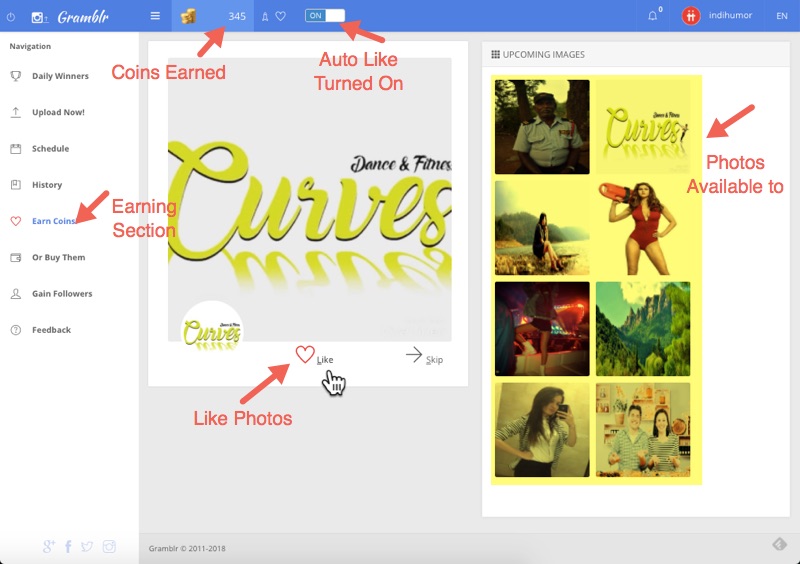
Back in the beginning of 2016 when I got my first smartphone and was introduced with smart-world I was looking for an options to upload the image in Instagram (IG) from the PC directly. And I found this partially crippled but so widely used system - Gramblr. It was built online but it has its own downloadable web client. It was more than just an image uploader for Instagram. It has its own lets-make-profit system with users earning credits by giving likes to other user IG images. It had this 2:1 system - you have to like two other images and then you got one credit. And you can spend this Gramblr credit exchanging it to a one "like". There was a list of 100 images loaded for you as an user to check whether you like an image or not. Of course, simple users were earning these credits by clicking on all images posted to maximize their credit profit. The whole system was flawed by this "earning credits" system but somebody got profit. If you want you could buy credits. If I`m not mistaken, 100 guaranteed likes (credits) costed 5 bucks.
Earn Coints to Get More Likes via Gramblr - Techtippr
This is the moment where things got interesting for me. It should be possible to automatize this gaining credits algorithm. And how does the credit system work? And I started to explore.

Tech

I was wondering how does this web client Gramblr.exe works. My antivirus and google chrome shows it as a dangerous malware software. I`m not a security expert at all, I just wanted to see, what the hell it is doing and how does it work and processes and etc. It was blended rather deep in the windows (Yea, I`m sitting on Win 7) automatic startup - it had its service, it had registry entries.
And how does it communicate? How does the data is sent, encoded?

Next finding was that my client is actually a simple web-server passing and receiving web requests to the Gramblr online webserver. Well, this gives a relatively simple approach to automatize requests. Of course, requests need analysis, whats in them, how do they work. And I started to play with Python 2.7. The required libraries were:

  1. import requests
  2. import json
  3. import random
  4. import re
  5. import time

so - how to connect? There is a login screen, so I have to be logged in. I was lazy and didnt make any login requests, I noticed that there is a cookie which changes every time I log in and log out and as I mostly stayed logged in, I cheated and logged in in the web client and copied cookie`s id from there for my script.
This was all I need to do a handshake with a server.

  1.  def gramblr_req(self):
  2.         """
  3.         Does GET request to get basic info of user
  4.         """
  5.         headers = {
  6.             "Accept-Encoding":self.h_encoding,
  7.             "Accept-Language":self.h_language,
  8.             "User-Agent":self.h_useragent,
  9.             "Accept":"application/json, text/plain, */*",
  10.             "Referer":self.localhost_url,
  11.             "Cookie":self.h_cookie,
  12.             "Connection":self.h_connection
  13.         }
  14.         try:
  15.             results = requests.get(self.gramblr_url, headers=headers)
  16.             self.coins=json.loads(results._content)["coins"]
  17.         except:
  18.             self.gramblr_req()

as I was lazy I didnt check was all header info actually needed.
After successful handshake the result was a JSON file with all info about my profile. What I was after was credits in the system, called coins. 1 credit = 5 coins. From the script one can recognize a Python class.

When I am authenticated in the system now, next thing was to get a list with an images and all necessary info which were posted by other users to gain likes. In the web client these images were loaded in the "Earn Coins" section. User could click on the images he/she likes and gain those coins. So, I had to emulate this request.

  1.  def GET_list(self):


  2.         results={}
  3.         results["list"]=False
  4.         try:
  5.             counter=0
  6.             while not results["list"]:
  7.                 results = requests.get(self.earn_coins_url, self.headers)
  8.                 self.results=results
  9.                 localtime = time.asctime( time.localtime(time.time()) )
  10.                 counter=counter+1
  11.                 results=json.loads(results._content)
  12.                 time.sleep(1)
  13.             fullstrings=""
  14.             iterstrings=iter(results["list"])

  15.             for each in iterstrings:
  16.                 fullstrings=fullstrings+'{"id":'+str(each["id"])+'},'
  17.             self.liste='{"liked":[],"skipped":[],"ignored":['+fullstrings[:-1]+'],"ig_user":"myinstagramusername"}'

  18.             self.results= self.results._content
  19.         except:
  20.             self.GET_list()
  21.         try:
  22.             outF=open("myOutFile.txt","r+")
  23.             userlist=set(str(line.strip()) for line in outF)
  24.             outF.close()
  25.             for counter, each in enumerate(results["list"]):
  26.                  userlist.add(str(each["details"]["username"]))
  27.             userlist=sorted(userlist)
  28.             outF=open("myOutFile.txt","r+")

  29.             for each in userlist:
  30.                 outF.write(each)
  31.                 outF.write("\n")
  32.             outF.close()
  33.         
  34.         except:
  35.             pass

This was kinda tricky. I noticed that when I was jumping between multiple web clients the list of images sometimes loaded incompletely, sometimes disappeared. From the code snipped one can see the recursion in case of failed requests. Yea, as I was interested in making an automation, its good as long as it works. And it worked.
The other thing I was interested was unique users using Gramblr.  That is why the last part of the script is doing - scraping the usernames and accumulating in the list. I managed to find 98`976 unique users which means max likes one could get is this number which is unrealistic.
When I know which pictures are in list, I can move to "giving likes" request for each picture. But before there, notice the line 40 in previous snippet. A class variable "liste" in JSON format was prepared and this was crucial for the "giving likes" request:

  1. def POST_list(self):
  2.         values=self.liste
  3.         results = requests.post(self.give_like_url,values,self.headers)


Just that simple. Previously prepared JSON data was sent to the server containing which images got likes, which did not. The whole list was passed to the server and it had a weird behavior and also consequences. Through experiments I found a flaw here. The order of requests was the key to successfully gain credits more than I expected with just a simple bot-like automation. It could be done manually with two web-clients open simultaneously too and by clicking on images with a mouse just in a right order.

And this is the last request important for the whole "gaining free more than expected credits" story - request to give a like to some IG image. In reality it meant that this image showed up in the Gramblr image list for credits and everybody who wanted to gain some credits had to give a like to it to earn one credit.

  1.  def POST_like(self,fname):
  2.   
  3.         self.pickIGfromFile(fname)
  4.          try:
  5.             values='{"ig_user":"myinstagramusername",' \
  6.                    '"likes_qty":1,' \
  7.                    '"local_likes":false,' \
  8.                    '"media_pk":"'+self.igUser["media_pk"]+'",' \
  9.                    '"user_pk":'+str(self.igUser["user_pk"])+'}'

  10.             results = requests.post(self.add_likes_url,values,self.headers)
  11.         except:
  12.             self.POST_like(fname)       #recursion

What one can see in this snippet is that I had IG links already prepared in a file and there is another helper function which just picks random link in that file and passes it to the Gramblr request.


I already mentioned "The right order of requests" which was the successful key of gaining more than I expected of this automation. By sending requests in particular order they somewhat reset the credit counting and accumulation in the Gramblr online webserver.

  1. if __name__=="__main__":
  2.     G = Gramblrscripter()
  3.     G.gramblr_req()
  4.     coins_b=G.coins
  5.     ii=1000

  6.     for i in range(ii):

  7.         G.GET_list() #loads image list 
  8.         G.POST_like('iglinks.txt') #gives one like to an IG image (link needed)
  9.         G.POST_list() #noposto listi #posts image list which got likes and which didnt

  10.         G.gramblr_req()
  11.         coins_e=G.coins
  12.         print "gained likes: \t\t\t\t\t|\t", (coins_e-coins_b)/10
  13.         coins_b=coins_e

Most likely this "giving like" request in between both image list requests made Gramblr system to reset credit counting/waiting/managing flag in their database.

The final math and maximized credit gaining data flow would look like this:

0) Lets say, I have 2 credits in the beginning

1) Image List loaded with 100 images - max 100 credits waiting for me to get
2) IG image liked -online system, db reset, 2 credits spent. Now I have 0 credits.
3) modified Image List posted with first image getting only one like from me - I spend 2 credits, I gain 100 credits instead of 1.

///cycle continues///Now I have 100 credits

4) Image List loaded with 99 images (the one I previously gave like in the step 3 is already out of the list) - max 99 credits waiting for me to get
5) IG image liked - online system, db reset. 2 credits spent. Now I have 98 credits.
6) modified Image List posted with "next first" image getting only like from me - I spend 2 credits, I gain 99 credits instead of 1.
Altogether I have 98+99 = 197 credits.

// cycle continues until there is no image left in the loaded image list.


Full python code can be found and analysed here - https://pastebin.com/vV9j1nSD

Conclusions and final thoughts

I highly doubt that this is what killed Gramblr. The system by concept was having flaws, I did not manage to explore and analyse "gaining followers" part, but I had a suspicion that somewhat users were automatically added as followers. My IG account suddenly was following more than 3k users without my knowledge. That means the system is malware in my opinion. 
The amount of unique users (98`976) where most of them most likely were bots and commercial users. In the beginning I was choosing one of my own IG images to find how many likes that IG picture could get. It gained close to 9k likes which is 10% of users. At that time I noticed the system was used by ~30k users, which would say ~30% of the system users could be the actual amount of likes possible to get.
The IG itself is also worth to mention. It has its artificial intelligence for sure. IG top picks and exploration I suspect originally was built on hashtags. But because of the bots and the systems which artificially increase the number of likes, some intellectual measures IG had to implement. Time as a crucial parameter can be measured. If the image in the IG got close to 500 likes within 5 seconds it has to be suspicious, spiking. Rate of change is a perfect indicator to flag unusual and suspicious activities. That was another flaw what Gramblr had. If I had 500 credits and I use them at once to boost my IG image, it may be flagged. Back in 2016 when I was experimenting, I noticed that my images with hashtag showed up in the search but over time they disappeared, suggesting me to think the IG had their preventive measures improved and giving no benefit of low IG users floating on the IG surface among most popular IG influencers. Thus by using Grambrl this did more harm than good to IG users. This is also a reason why I implement helper function self.pickIGfromFile(fname-  to have a lot of random IG images and giving those likes with a random time interval thus reducing the rate of change of getting likes. Less suspicious for IG.

2019-02-18

555 timer examples in falstad circuits

Few 555 timer chip examples built digitally in falstad circuit builder.

This one is Schmitt trigger with 2/3 and 1/3 Vcc hysteresis.
Check out extra sliders and see how current through led changes.

Simulation is here - http://tinyurl.com/y4rnjs4o


Another one - LDR logic board. Similar, but without hysteresis as threshold pin is connected to stationary 10k resistor, so the output is passed on at strict threshold level chosen by adjusting the variable resistor.

And the simulation - http://tinyurl.com/y6l7blt2


Here is a monostable circuit. Use switch as a push button and the LED will stay turned on for a certain time.

http://tinyurl.com/y6o47oxw